
If you want to view your Next.js app and the Storybook for your UI package in one place even after separating them in a monorepo, you can run each Storybook independently and link them via the refs in the central Storybook. This is called Storybook Composition.
However, Composition isn’t always necessary. Since Storybook currently offers a framework specifically for Next.js, it’s simpler to include UI package stories in a single Next.js Storybook instance for small projects that share the same dependencies and deployment cycles. I chose Composition because I needed to separate the configuration, ownership, and deployment of the UI package from the web app.
Structure Used
Initially, I was only displaying components from packages/ui in the shared Storybook. When I imported the apps/web code as-is to verify the service page composition and Provider state, dependencies from the Next.js environment and the web app spilled over into the shared Storybook.
So I divided the roles as follows:
monorepo/
├── apps/
│   ├── storybook/ # Composition host, :6006
│   └── web/
│ └── .storybook/     # Next.js app Storybook, :6008
└── packages/
    └── ui/
└── .storybook/ # UI package Storybook, :6007packages/ui: Reusable components and design system storiesapps/web: Stories that depend on actual pages, layouts, and the app providerapps/storybook: A hub for exploring both Storybooks without loading component code
For the Next.js app, we use the currently recommended @storybook/nextjs-vite. It requires Next.js 14.1 or higher and Vite 5 or higher, and supports features such as next/image, routing, next/head, and fonts. The reason we chose Composition is not because Next.js cannot run in Storybook, but to isolate dependencies and configurations for each area.
Local Composition Configuration
Add refs to the host file, apps/storybook/.storybook/main.ts.
import type { StorybookConfig } from "@storybook/react-vite"

const config: StorybookConfig = {
  stories: ["../src/README.mdx"],
  framework: "@storybook/react-vite",
  refs: (config, { configType }) => {
    if (configType === "DEVELOPMENT") {
 return {
 ui: {
 title: "UI Development",
 url: "http://localhost:6007",
 },
        web: {
 title: "Web Development",
 url: "http://localhost:6008",
 },
 }
    }

    return {
 ui: {
 title: "UI",
 url: "https://main--<ui-app-id>.chromatic.com",
 },
      web: {
 title: "Web",
 url: "https://main--<web-app-id>.chromatic.com",
 },
    }
  },
}

export default config
Port mappings must be consistent from start to finish.
| Role | Address |
|---|---|
| Composition Host | http://localhost:6006 |
| UI Package | http://localhost:6007 |
| Next.js Web App | http://localhost:6008 |
Storybook reads the index.json file at the reference URL to display the list of stories in the navigation panel. Therefore, http://localhost:6007/index.json and http://localhost:6008/index.json must be open in the browser. Since the frames in the Storybook are loaded directly by the user’s browser, if they use an internal address or require authentication, the viewer must have the necessary access permissions.
Safely Running the Three Storybooks in Order
You can launch each Storybook in a separate terminal.
# Terminal 1
pnpm --filter ./packages/ui storybook -- --port 6007

# Terminal 2
pnpm --filter ./apps/web storybook -- --port 6008

# Terminal 3
pnpm --filter ./apps/storybook storybook -- --port 6006
If you start all three tasks in parallel, as with Turborepo, the host may start up first. In this case, the reference server isn’t ready yet, so the index.json request fails. You just need to wait until both metadata URLs return a 2xx status using wait-on, which is already in use in the host package’s script.
{
  "scripts": {
    "storybook": "wait-on http-get://localhost:6007/index.json http-get://localhost:6008/index.json && storybook dev -p 6006"
  }
}
The reason for using http-get:// is not just to check if the port is open, but to actually send a GET request to index.json and verify a successful response.
Distinguishing Between “CORS Errors” and Setup Failures
The first console message I saw was as follows.

wait-on resolves only startup race conditions. If the browser still displays Access-Control-Allow-Origin or credentials errors even after the referenced server is fully up and running, this is an actual CORS configuration issue. In this case, you must fix the response headers or same-origin configuration of the proxy or hosting service providing the referenced Storybook. Increasing the wait time will not resolve this.
Two steps are sufficient to verify this.
- Verify that the reference Storybook’s
/index.jsonreturns a 2xx status code and JSON data - Open the host Storybook and confirm that the UI and Web items are displayed in the navigation panel
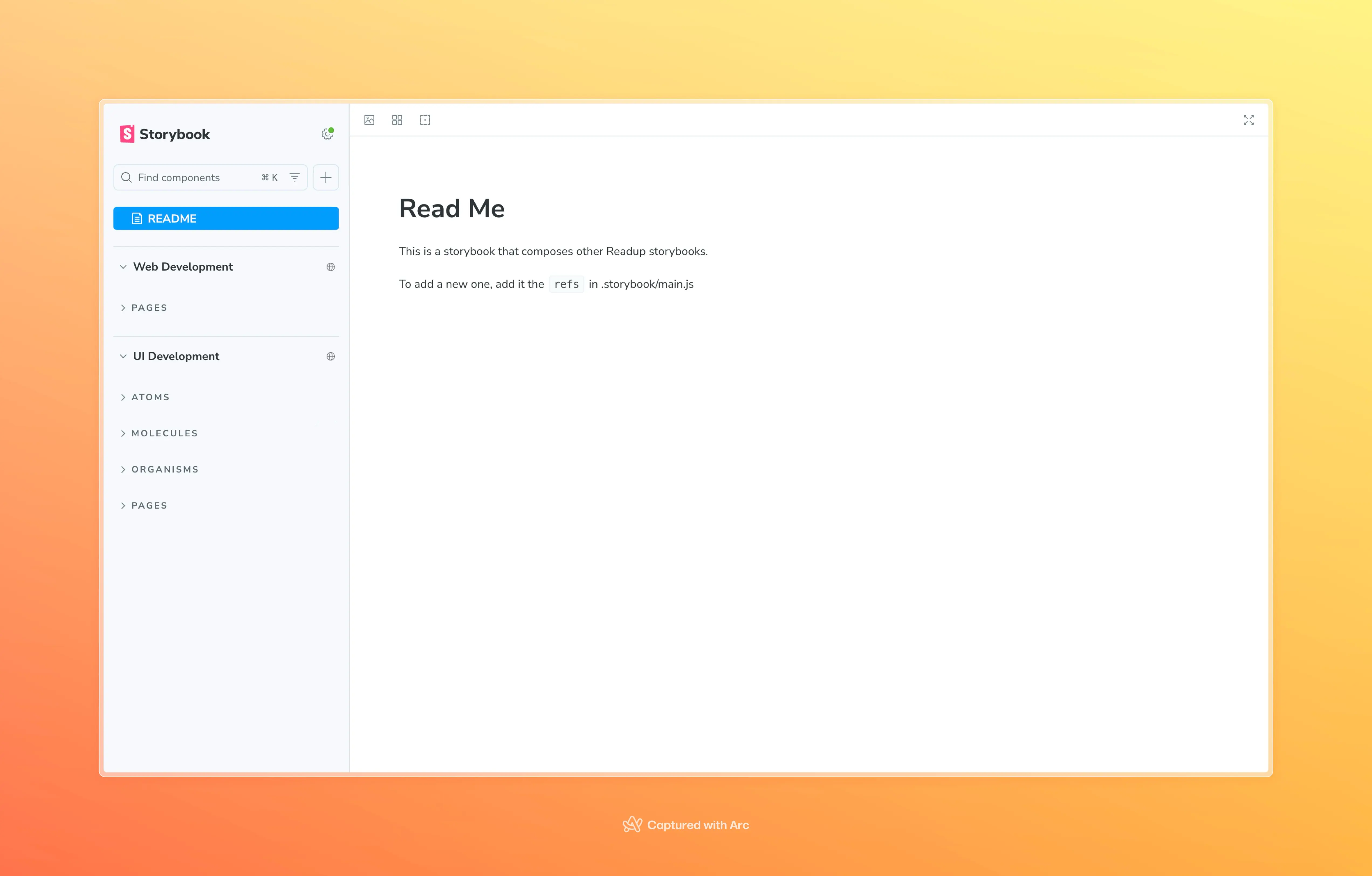
Linking the Chromatic Deployment URL
Build the UI, Web, and Composition separately in the deployment environment as well. In the host’s refs, we’ve included Chromatic’s branch permalink instead of a URL that changes with every build.
https://<branch>--<appid>.chromatic.comFor example, for the main branch, the URL would be https://main--<appid>.chromatic.com. Since this URL points to the latest build of that branch, you don’t need to change the host configuration every time.
You should also verify the visibility settings. Even if the Composition host is public, unauthorized users cannot view the stories if the referenced Chromatic project is private.
When to Choose Composition
The separation costs associated with Composition were justified under the following conditions:
- The UI package and the app use different Storybook frameworks or configurations.
- Different teams own or deploy each area independently.
- The host must not have runtime dependencies on the referenced packages.
- You need to view Storybooks from multiple repositories or tech stacks in a single navigation panel.
Conversely, if the same team deploys on the same schedule and there aren’t many stories, a single Storybook is preferable. Since Composition is not a feature for merging code but rather a feature for grouping already executable Storybooks via URLs, the build, hosting, and access permissions for the referenced Storybooks must still be managed separately.